React SEO: why SPAs hide from Google, and the fix
A client-side React app sends search engines an empty page and a script. Here is what crawlers see, and how server rendering with Next.js fixes it.

By Supacode Editorial · Product and engineering

Contents
Quick answer
- React SEO is hard by default because a client-side React app (a single-page app, or SPA) sends crawlers an almost empty HTML file and a JavaScript bundle; the text, links and titles only exist after that script runs.
- Google can render JavaScript, but in a later pass, and many other crawlers can't: Vercel's measurements found that none of the major AI crawlers render JavaScript, so they see the empty shell.
- The fix is to send real HTML in the first response: server-side rendering (SSR) or static generation, which Next.js gives you per route, with metadata and structured data rendered on the server.
- On Supacode, choose the Next.js stack when search traffic matters: every route is published as complete HTML, and apps that need a live server deploy to Vercel with SSR.
Why is SEO hard for a React single-page app?
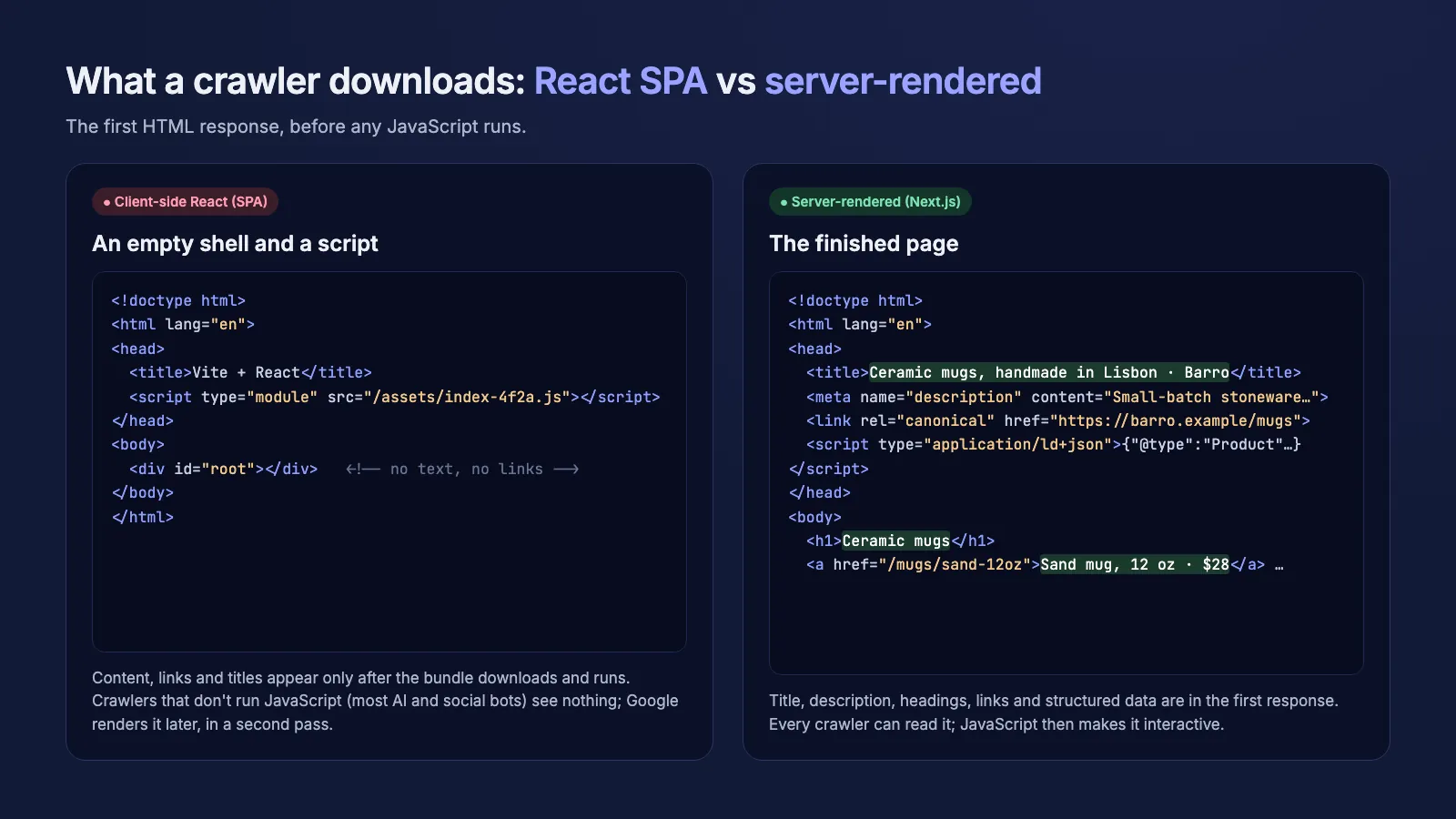
Open any app made with Create React App or a default Vite template and choose View Source. You won't find your headline, your product names or your links. You'll find a <div id="root"></div> and a <script> tag pointing at a bundle. Everything a visitor sees is drawn by that script after it downloads and runs in the browser.
That's client-side rendering, and for an app behind a sign-in screen it's fine. For a page you want people to find, it means the first thing a search engine downloads says almost nothing: a generic title, no description, no headings, no internal links to follow.
Google's own documentation describes the consequence: Googlebot crawls the HTML first, queues the page for rendering, and only indexes the JavaScript-generated content once a headless Chromium has run it. That second step can be delayed, and anything that breaks in it (a blocked script, an error, a slow API) means the content is never seen.
Client-side rendering is when the server sends an almost empty HTML page and the browser builds the content with JavaScript; server-side rendering is when the server sends the finished HTML.
Doesn't Google render JavaScript now?
It does, and that is why client-side React sites aren't invisible on Google. But rendering is a separate, later stage of Google's pipeline, and it only helps Google. Search is no longer one crawler.
Vercel analysed crawler traffic across its network and reported that none of the major AI crawlers currently render JavaScript; ChatGPT's and Claude's crawlers fetch JavaScript files but don't execute them. If an answer engine is going to quote or link your page, the content has to be in the HTML.
The same is true of link previews. When someone pastes your URL into a chat app or a social network, the preview bot reads the first HTML response for the title, description and og:image. An SPA usually shows the same generic title for every page, or nothing at all.
Google used to suggest dynamic rendering (serving crawlers a pre-rendered copy) for JavaScript-heavy sites. Its documentation now calls that a workaround and recommends server-side rendering, static rendering or hydration instead.
- Google: renders JavaScript, but in a second, delayed pass.
- AI crawlers (ChatGPT, Claude and others): read the HTML only.
- Social and chat link previews: read the HTML only.
SSR, SSG or prerendering: which React rendering fixes SEO?
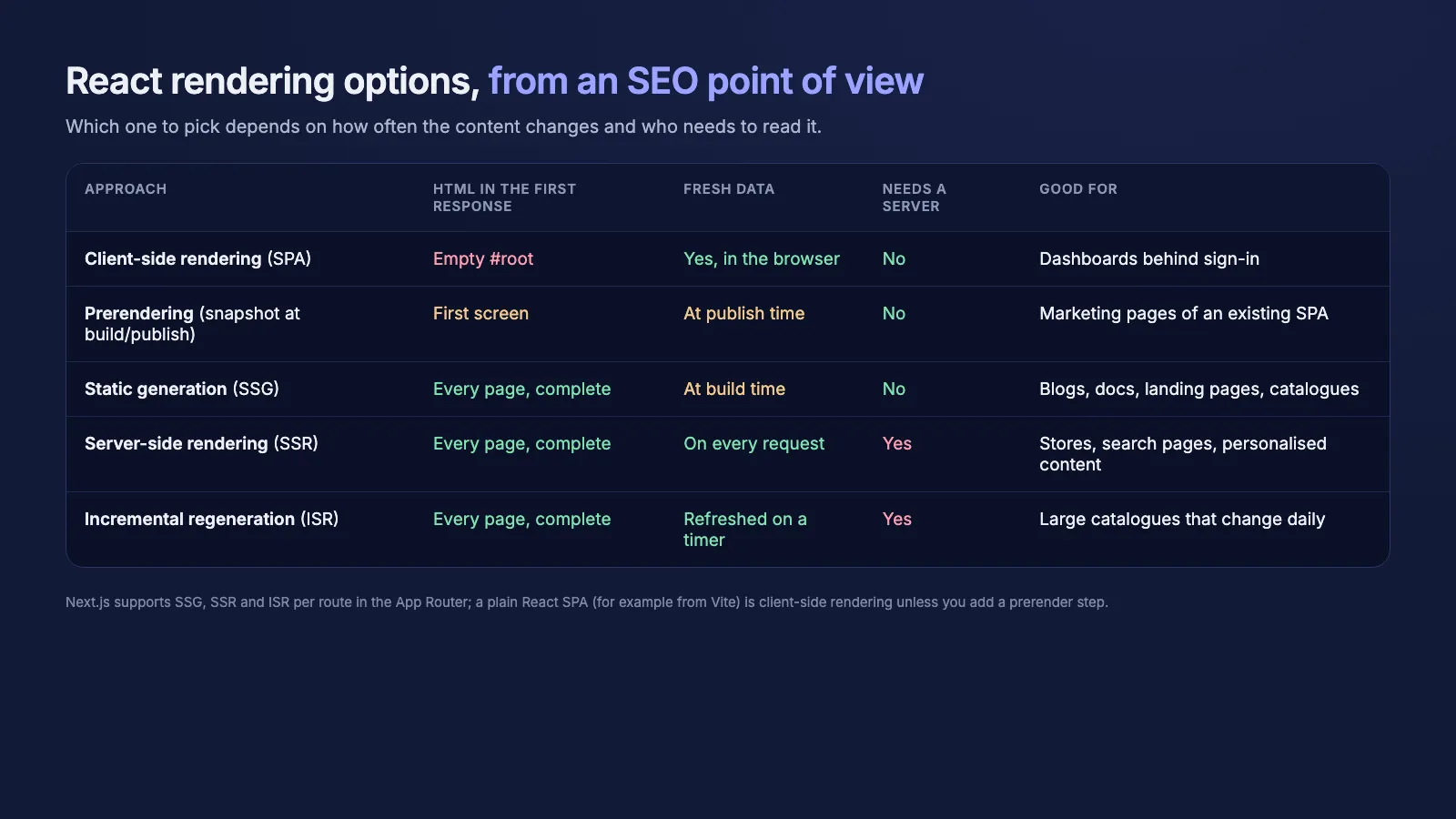
All of the fixes share one idea: put the real content in the first HTML response, then let React take over in the browser (this hand-over is called hydration). They differ in when the HTML is made.
Static generation (SSG) renders each page once at build time. It's the fastest and cheapest option, and the right one for blogs, docs, landing pages and catalogues that change a few times a day at most. Server-side rendering (SSR) renders on every request, which you need when the page depends on fresh data or on who is asking: search results, stock levels, personalised pages. Incremental regeneration sits in between, re-rendering static pages on a timer.
Prerendering an existing SPA (capturing the HTML of the first screen at build or publish time) is a useful patch for a marketing page, but it only covers what a browser saw on that one visit. It isn't a substitute for rendering every route.
How does Next.js solve React SEO?
Next.js is a React framework, so you keep writing React components. What changes is where they run. In the App Router, components are server components by default: they render to HTML on the server (at build time or per request), and only the parts that need interactivity ship JavaScript to the browser as client components.
That gives search engines complete pages, and it gives you the SEO tools in the same place as the page: generateMetadata for the title, description, canonical URL and Open Graph tags; sitemap.ts and robots.ts for crawl files; and JSON-LD structured data rendered straight into the HTML.
You choose per route. A pricing page can be static, a product page can be server-rendered with fresh stock, and an account dashboard can stay client-side behind sign-in, all in one app.
- Move public pages into the App Router as server components; keep
"use client"for the interactive pieces only. - Return a real title, description and canonical URL from
generateMetadataon every public route. - Add
sitemap.tsandrobots.ts, and render JSON-LD (Product, Article, FAQPage) that matches what's visible. - Check View Source, not the browser's element inspector: the text you want indexed must be in the raw HTML.

How does Supacode publish React and Next.js apps for search?
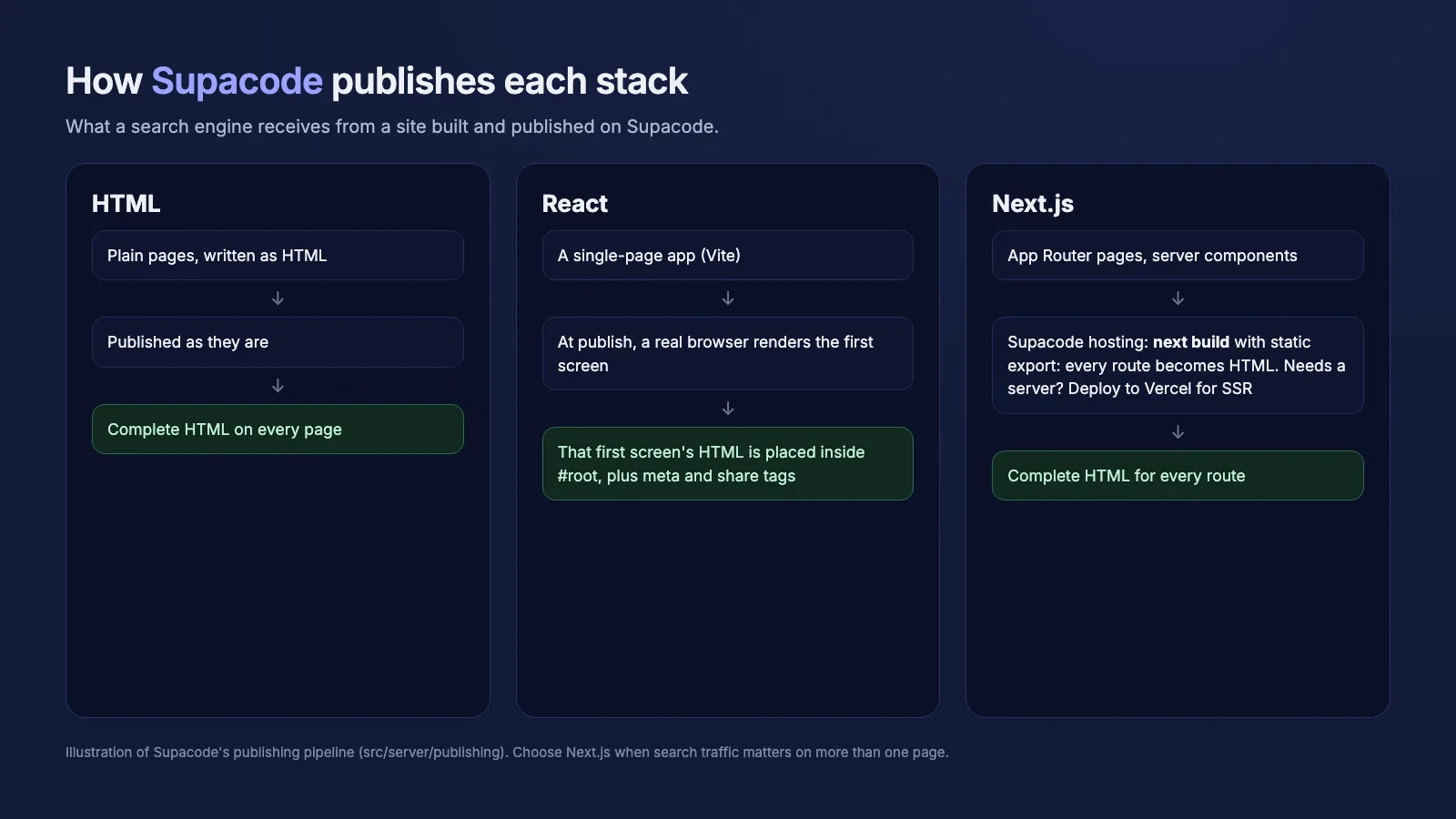
Supacode, an AI app builder by Transcend Technologies, lets you describe an app in plain words and builds it in one of three stacks: HTML, React or Next.js. How each one is published decides what a search engine receives.
Next.js projects are the choice for search. On Supacode's own hosting, publishing runs next build with static export in the project's sandbox, so every route becomes a complete HTML page with its metadata. When an app needs a live server (server actions, API routes, per-request rendering), Supacode says so and points you to "Deploy to my Vercel" in the Publish menu, which hosts the same Next.js app on your own Vercel account with server-side rendering.
React projects are single-page apps, so Supacode adds a safety net: at publish, a real browser renders the site's first screen and that HTML is placed inside #root, together with the title, description and share tags. Crawlers that don't run JavaScript get the first screen instead of an empty page. It's the prerendering patch described above, so for anything with more than one page that should rank, start in Next.js.
Building a new app that needs search traffic?
Pick the rendering model before the first line of code, because moving a grown SPA to server rendering later is a rewrite of its data loading. On Supacode that choice is the stack selector in the composer: choose Next.js, describe the app, and ask for the pages you want found ("a product page per item with its own title and description").
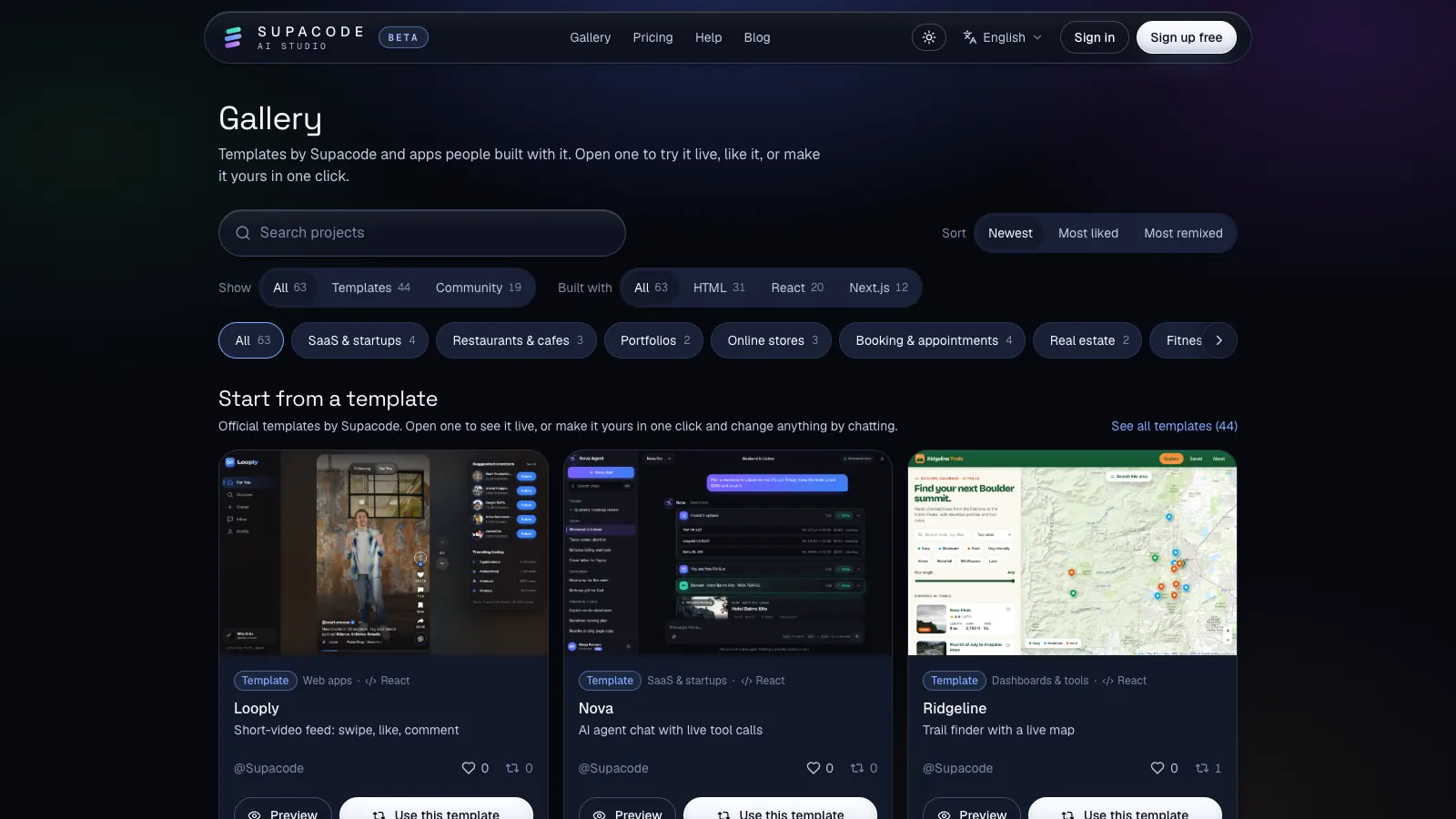
Browse the templates in the gallery for Next.js starting points, read how publishing and custom domains work, compare plans on the pricing page, and see the multilingual SEO checklist for Next.js if you serve more than one language.
FAQ
Frequently asked questions
Is React bad for SEO?
React itself isn't. Client-side rendering is: a React single-page app sends an almost empty HTML page, so crawlers that don't run JavaScript see nothing. React rendered on the server, for example with Next.js, is fully crawlable.
Can Google index a React single-page app?
Usually, yes. Google renders JavaScript in a second, later pass. Indexing can be delayed or incomplete if scripts fail, and other crawlers, including AI crawlers and link-preview bots, don't render JavaScript at all.
What is the difference between SSR and SSG?
Server-side rendering (SSR) builds the HTML on every request, for pages with fresh or personalised data. Static site generation (SSG) builds it once at build time, for pages that rarely change. Both send complete HTML to crawlers.
Do AI search engines read JavaScript-rendered content?
Mostly not. Vercel's crawler measurements found that none of the major AI crawlers currently render JavaScript, so content that only exists after scripts run is invisible to them.
Should I use Next.js or React for an app that needs SEO?
Next.js. It is React with server rendering, per-route metadata, sitemaps and structured data built in. Keep a plain React SPA for parts behind a sign-in screen, where search engines can't go anyway.
Which Supacode stack should I choose for SEO?
Next.js. Every route is published as complete HTML, and apps that need a server deploy to Vercel with server-side rendering. React sites get only their first screen prerendered at publish.
Sources
- Understand JavaScript SEO basics · Google Search Central
- Dynamic rendering as a workaround · Google Search Central
- The rise of the AI crawler · Vercel
- Rendering on the Web · web.dev
- Server and Client Components · Next.js
- Static Exports · Next.js
- Server React DOM APIs · React