How to Build an App Like ChatGPT (Chatbot Guide, 2026)
How to build an app like ChatGPT: the real architecture, what the API costs, and a step-by-step way to ship a working chatbot website with AI.

By Supacode Editorial · Product and engineering
Contents
Quick answer
To build an app like ChatGPT, you don't train an AI model. You build three things: a chat interface, a small server that keeps your API key secret and streams replies from a model provider such as OpenAI, Anthropic or Google, and a database for conversation history. An AI app builder like Supacode gets the interface running in minutes; a Next.js server route deployed to your own Vercel account connects it to a real model.
- ChatGPT is a product layer on top of a large language model. Your app calls a model through an API and pays per token.
- Never call the model straight from the browser: a server route holds the key, adds the system prompt and streams the answer back.
- A typical message costs a fraction of a cent. Model choice changes the bill by roughly 20× (see the cost table).
- In Supacode: start from the Nova template or one prompt, shape the interface by chatting, publish, then connect a real model with Next.js.
What does it actually take to build an app like ChatGPT?
In November 2023, less than a year after launch, OpenAI's chief executive told developers that ChatGPT had reached 100 million weekly users. Since then, founders, agencies and curious weekend builders have asked the same question: could I make one of those?
The honest answer is yes, with one clarification that changes everything. The hard part of ChatGPT, the model, is something you rent, not something you build. Training a frontier model costs more than most companies will ever raise. Calling one costs a fraction of a cent per message. Everything a user actually touches (the sidebar of past chats, the text that streams in word by word, the code blocks with a Copy button) is ordinary web software.
That splits the project into three layers you can reason about separately:
- The interface: a chat window, a history sidebar, a composer, Markdown rendering, a model picker. This is a front-end app, and it is exactly the kind of thing an AI app builder writes well.
- The server: a small endpoint that receives a message, checks who is asking, adds your instructions (the system prompt) and past messages, calls the model provider, and streams the reply back.
- The data: users, conversations and messages in a database, plus, optionally, your own documents so the bot can answer questions about your business.
Get those three right and you have a ChatGPT-style app. Everything else (voice, image input, plug-ins) is a later chapter.
How does a ChatGPT-style app work under the hood?
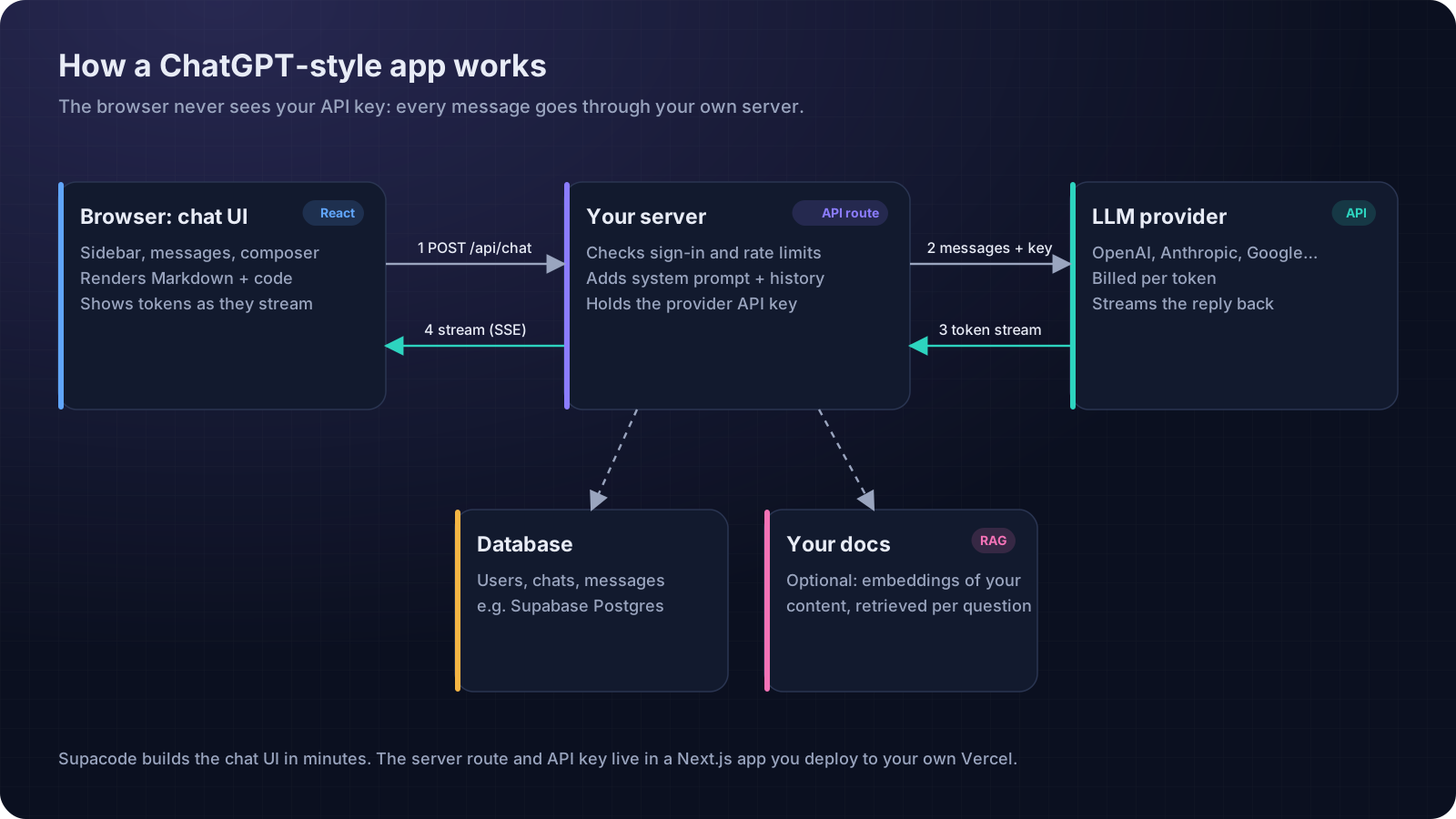
Follow one message through the system. A user types “Summarise this contract” and presses Enter. The browser sends a POST request to your own endpoint, for example /api/chat, with the conversation so far. Your server checks the session, applies a rate limit, prepends a system prompt (“You are Atlas, a careful assistant for freelance designers…”) and calls the provider's API with your secret key.
The provider does not return the whole answer at once. It streams tokens, small chunks of text, as they are generated. Your server forwards them to the browser, typically as server-sent events, and the interface paints each chunk as it arrives. That is why ChatGPT feels fast even when a long answer takes ten seconds to finish. Usability research has long put the limit for keeping a user's attention at about one second before something visibly happens; streaming gets the first words on screen well inside it. Both OpenAI and Anthropic document streaming, and libraries like the AI SDK wrap it in a few lines of TypeScript.
Two details separate a toy from a product:
- Memory is something you send, not something the model has. Models are stateless. Each request includes the recent conversation, so long chats get more expensive per message. Real apps trim or summarise old turns.
- Knowledge comes from retrieval. To answer questions about your own help docs or catalogue, store them as embeddings and fetch the most relevant passages for each question (retrieval-augmented generation, or RAG). Postgres with pgvector, which Supabase supports, is a common way to do it.
How much does it cost to run a chatbot?
Model providers bill per million tokens (MTok), separately for input (what you send, including history) and output (what the model writes). A token is roughly three-quarters of an English word. Prices below are Anthropic's published list prices as of November 2026; check the current page before you budget, and compare with OpenAI's pricing and Google's Gemini pricing.
| Model | Input price | Output price | Cost per message | 600,000 messages a month |
|---|---|---|---|---|
| Claude Haiku 5.5 | $0.10 / MTok | $0.50 / MTok | ≈ $0.00035 | ≈ $210 |
| Claude Sonnet 5.5 | $2 / MTok | $10 / MTok | ≈ $0.007 | ≈ $4,200 |
| Claude Opus 5.5 | $4 / MTok | $20 / MTok | ≈ $0.014 | ≈ $8,400 |
600,000 messages is what 1,000 active users sending 20 messages a day for a month looks like. The spread is the lesson: the same app can cost a couple of hundred dollars or several thousand depending on the model behind it. Three levers matter most:
- Route by difficulty. Use a small, fast model for routine questions and a larger one only when needed.
- Cap the history. Send the last few turns plus a short summary rather than the entire conversation.
- Cache the fixed part. A long system prompt that never changes can be cached; Anthropic documents prompt caching with much cheaper cache reads.
Hosting is the smaller line item. A Next.js app on Vercel runs its API routes as functions, and a database for chat history fits comfortably in a free or entry tier while you are small.
How do you build a ChatGPT-style app step by step?
Here is the fastest honest path we know: build and publish the interface with Supacode today, then connect a real model when you are ready. Supacode writes real HTML, React or Next.js code, runs it in a live preview and saves every change as a version you can restore.
Step 1: Start from a template, or from one prompt
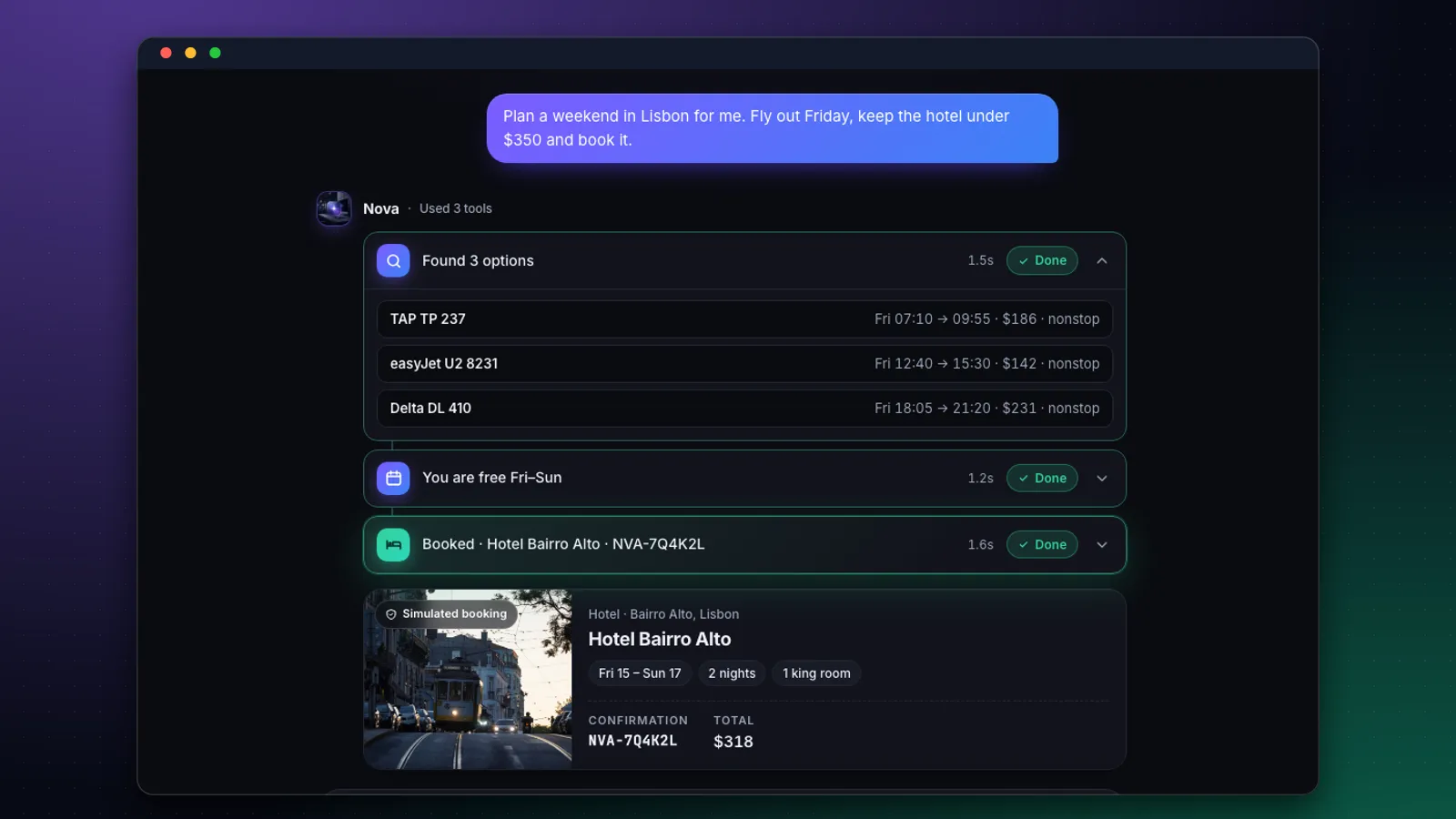
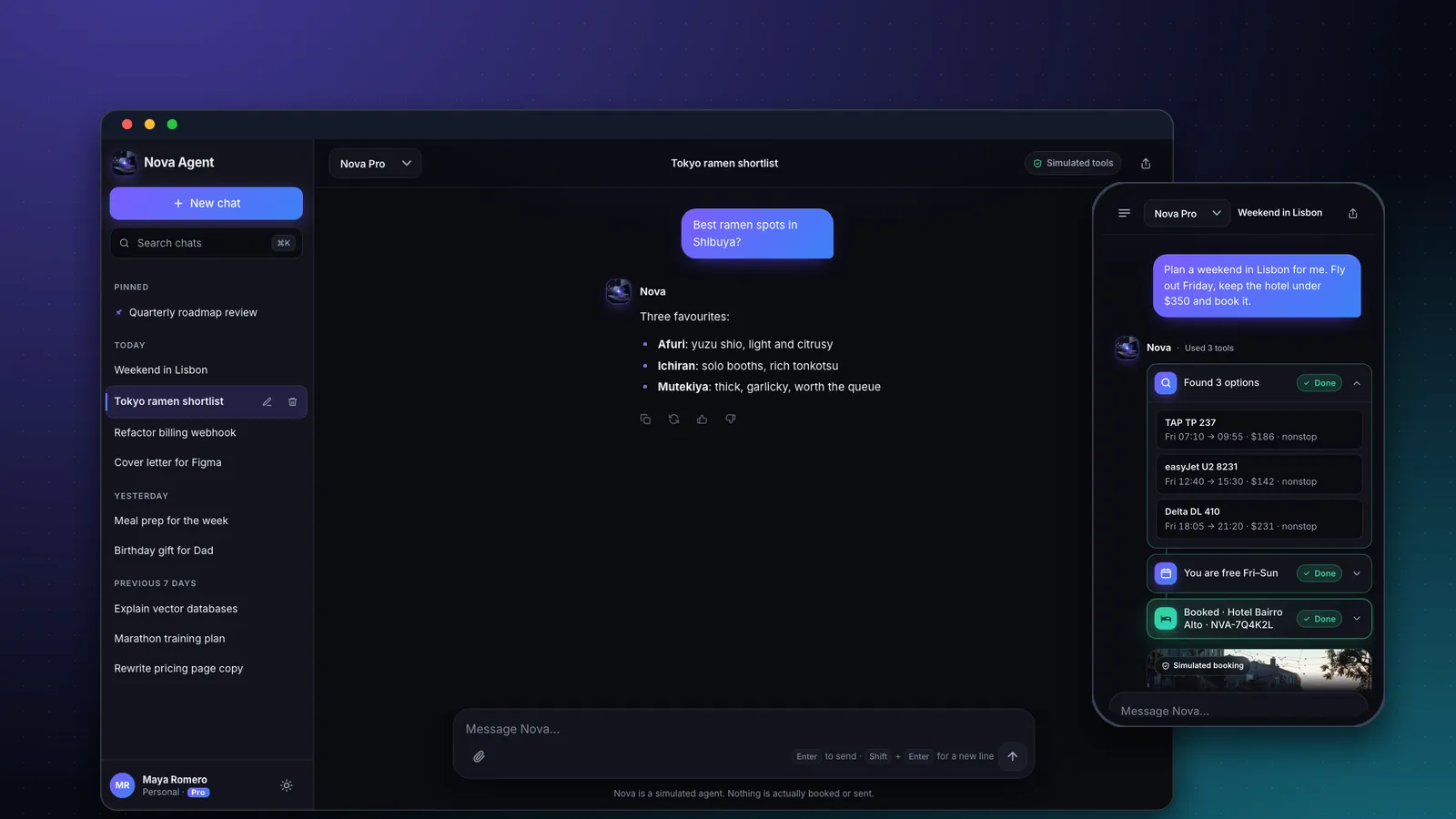
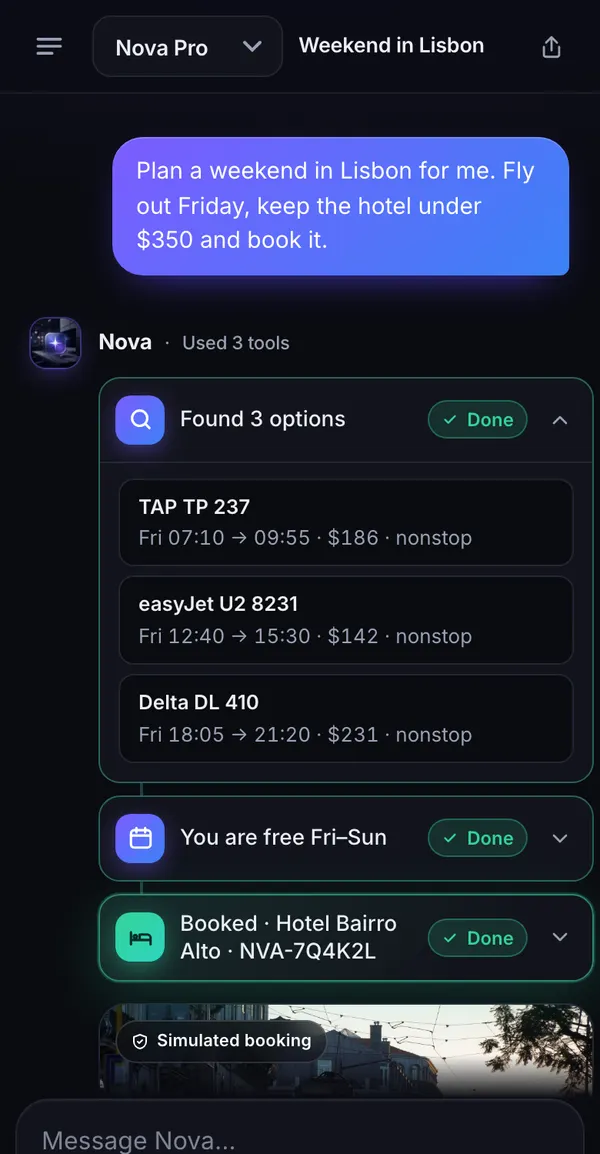
The quickest start is the Nova template: a React chat app with a history sidebar, Markdown answers, tool-call cards and a model picker. Copying a template uses 0 credits. Its replies are simulated with sample conversations, and the app says so on screen, which makes it a safe prototype to show people.
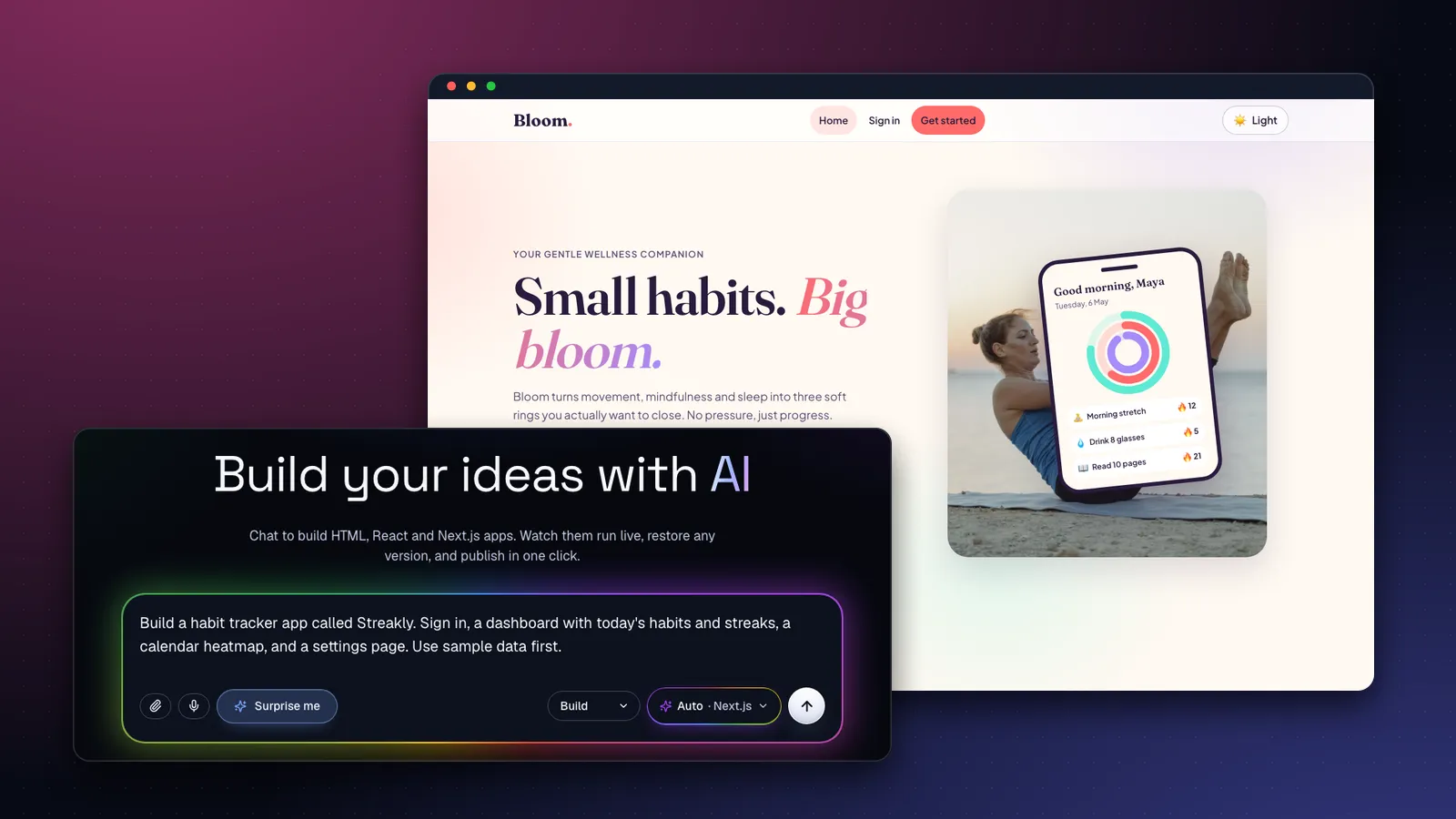
If you would rather start from a blank page, describe the product in the home composer. Be specific about the parts that make it feel like ChatGPT:
Build a ChatGPT-style chat app called Atlas. Left sidebar with chat history grouped by Today / Yesterday / Previous 7 days and a New chat button. A centered conversation with streaming-style replies, Markdown and code blocks with a Copy button, regenerate and thumbs up/down under each answer, and a model picker in the header. Dark and light themes. Use realistic sample conversations and simulate the replies for now.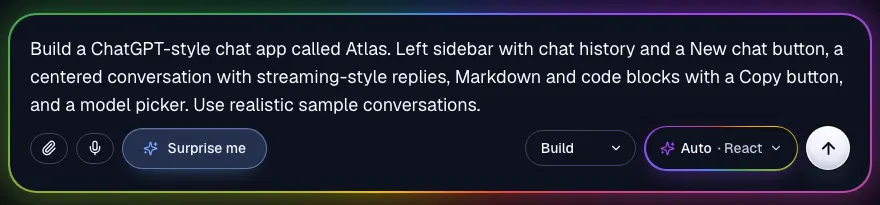
Step 2: Shape the experience by chatting
Supacode applies each request as a focused edit and saves a new version, so you can undo anything. Ask for one change at a time:
Make replies appear word by word with a blinking cursor, add a Stop generating button while a reply is streaming, and keep the composer pinned to the bottom on phones. Don't change the sidebar.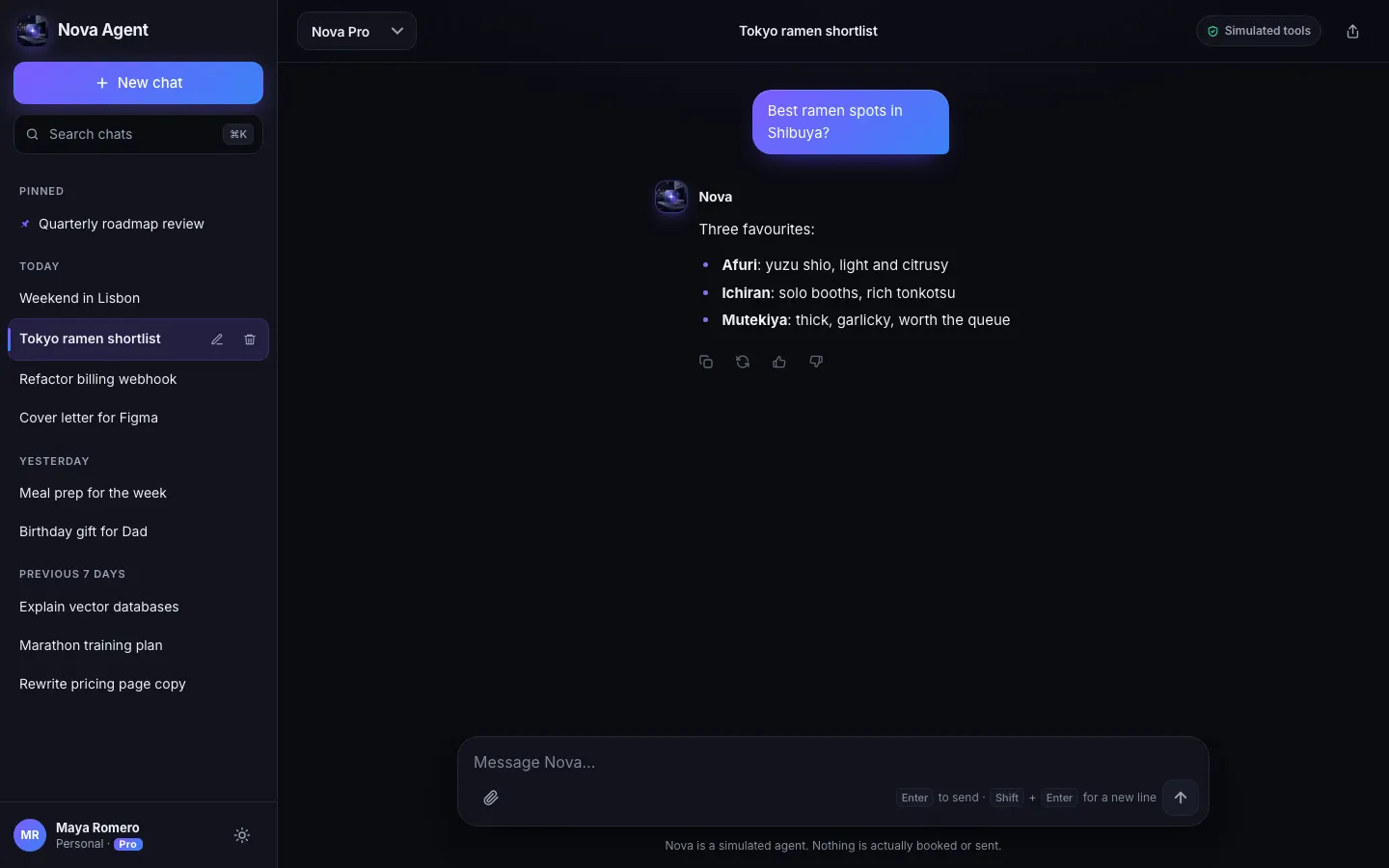
Step 3: Give it a job
General-purpose chat is ChatGPT's home turf. A focused assistant (a contract explainer for freelancers, a recipe coach, a support bot for your product) is where a small app can win. Put the job into the sample data and copy:
Turn Atlas into Clause, an assistant that explains freelance contracts in plain English. Replace the sample chats with contract questions, add a 'Paste a clause' starter card on the empty state, and write the system prompt we'll use later into src/lib/system-prompt.ts.Step 4: Publish and share it
Press Publish to put the app on your own your-name.supacode.app address. Anyone with the link can open it; it appears in the public gallery only if you switch that on. The publishing guide covers updates and unpublishing.
Step 5: Connect a real model
A React or HTML app runs entirely in the browser and cannot keep a secret, so the real model call needs a server. Create the production version as a Next.js project (pick Next.js instead of Auto in the composer, and paste in the design prompts from Steps 1 to 3) and ask for a server route:
Add a Next.js route handler at app/api/chat/route.ts that streams replies from the Anthropic API using the AI SDK. Read the key from process.env.ANTHROPIC_API_KEY (never send it to the browser), use the system prompt from src/lib/system-prompt.ts, send only the last 10 messages, and limit each IP to 20 messages per hour. Replace the simulated replies with this endpoint.Supacode notices that a server route needs a server: instead of a static publish, the Publish menu offers Deploy to my Vercel, which creates a project in your own Vercel account. Add ANTHROPIC_API_KEY under that project's environment variables, deploy again, and the bot answers for real. Your key lives with you, in your account, not in Supacode.
Step 6: Add sign-in and saved chats
Connect your own Supabase project in the Backend tab and ask for accounts and history. Supacode writes the tables and row-level security policies as a migration, and nothing runs on your database until you approve it (how it works).
Add email sign-in with Supabase Auth. Store conversations and messages in Supabase with row-level security so each user can only read their own chats. Load the sidebar from the database and save every message.How do you build a chatbot for a website?
Many people searching for a ChatGPT clone really want something smaller: a chat bubble in the corner of their site that answers customer questions. The architecture is identical (interface, server, model), just with a narrower interface and a knowledge base made of your own pages.
Add a floating chat button to the bottom-right of every page. It opens a 380px panel with a greeting, three suggested questions about our opening hours, prices and booking, and a composer. For now, answer from the FAQ content on the site with simulated replies; keep the panel keyboard accessible and closable with Esc.Start with simulated answers drawn from your FAQ, test the experience with real visitors, then connect a model through a server route as in Step 5 and feed it your pages. If your site lives elsewhere, the widget is ordinary code you can read in the Code tab, download as a zip, or push to GitHub on paid plans; the server route still needs a host that can keep your key secret.
Can you make a chatbot for free?
You can get surprisingly far without paying anything, as long as you know where the free tiers end.
| Piece | Free option | The catch |
|---|---|---|
| Interface | Supacode Free: 5 credits a day plus 20 welcome credits | Free sites carry a small Made with Supacode badge; up to 3 live sites |
| Server | Vercel Hobby plan | Hobby is for non-commercial, personal use |
| Database | Supabase Free plan | Free projects pause after a week of inactivity (pricing) |
| Model | Gemini API free tier | Rate-limited, and not every model is included (pricing) |
So the realistic plan is: prototype for free, show it to people, and start paying for the model once real users arrive. Supacode's pricing page lists what each plan includes; every action shows its credit cost before it runs, and if an automatic fix fails, those credits come back.
Should you use a chatbot builder, an AI app builder or code from scratch?
| Approach | First version | Control | Best for |
|---|---|---|---|
| Hosted chatbot widget platforms | An hour | Low: their interface, their limits | A support bubble on an existing site |
| AI app builder (Supacode) | Minutes for the interface; an afternoon with a real model | High: real React/Next.js code you can download or push to GitHub | A product with its own brand, flows and data |
| Code from scratch | Days to weeks | Total | Teams with engineers and unusual requirements |
The middle path is also a bridge. Because Supacode writes plain code into a project you own, a developer can pick it up later without a rewrite.
What should you check before you launch?
- Prompt injection. Users will try to talk your bot out of its instructions. The OWASP Top 10 for LLM applications is the best short list of these risks; never let model output trigger actions without checks.
- Abuse and cost. Rate-limit by user and IP, cap message length and history, and alert on unusual spend.
- Honesty. Tell users they are talking to an AI, and that answers can be wrong. Add a way to report bad answers.
- Privacy. Say what you store and for how long. Don't log full conversations you don't need.
- Accessibility. Chat interfaces are easy to make keyboard-hostile; our accessibility checklist covers focus, labels and motion.
FAQ
Frequently asked questions
Can I build an app like ChatGPT without training my own AI model?
Yes. Almost every ChatGPT-style app calls an existing model from a provider such as OpenAI, Anthropic or Google through an API. You build the interface, a server route that holds the API key, and a database for conversations.
How much does it cost to run a ChatGPT clone?
Mostly the model. With list prices from November 2026, a typical message costs about $0.00035 on Claude Haiku 5.5 and about $0.007 on Claude Sonnet 5.5, so 600,000 messages a month ranges from roughly $210 to $4,200 depending on the model. Hosting and the database are usually small by comparison.
Is the Nova template connected to a real AI model?
No. Nova's replies and tool results are simulated with sample data, and the app says so on screen. To use a real model, add a Next.js server route that calls a provider with your own API key and deploy it to your own Vercel account.
Can I put an API key in a React or HTML app?
No. Code that runs in the browser can be read by anyone, so the key would leak. Keep it in a server environment variable and call the model from a server route.
Can I make a chatbot for free?
You can prototype for free: Supacode's Free plan gives 5 credits a day plus 20 welcome credits, Vercel Hobby and Supabase Free cover small non-commercial projects, and the Gemini API has a rate-limited free tier. Expect to pay for the model once real users arrive.
How long does it take to build a ChatGPT-style app with Supacode?
The interface takes minutes from a template or a single prompt. Connecting a real model, sign-in and saved chats is typically an afternoon of focused prompts, plus the time to set up your own Vercel and Supabase accounts.