How to build a cloud storage app like Dropbox (2026 guide)
How cloud storage really works: object storage, metadata, sharing and sync. Then build a Dropbox-style app from the free Cairn Files template.

By Supacode Editorial · Product and engineering
Contents
Quick answer
- A cloud storage app has three layers: object storage for the file bytes, a database for who owns which file and who it is shared with, and an app where people upload, browse, preview and share.
- Never push large files through your own server or into your database. Hand the browser a short-lived signed URL and let it upload straight to object storage such as Amazon S3, Cloudflare R2 or Supabase Storage.
- Desktop sync like Dropbox's is the hardest part; most products launch with web upload, folders and share links first.
- With Supacode you can copy the free Cairn Files template for 0 credits, make it yours by chatting, then connect your own Supabase project for real accounts and files.
What does it take to build cloud storage like Dropbox?
Think about the last time a client sent you a 2 GB folder of photos. Email refused it, a chat app squeezed the images, and in the end someone pasted a link. That link is the whole product category: a place where a file goes up once, stays safe, and can be opened by the right people anywhere.
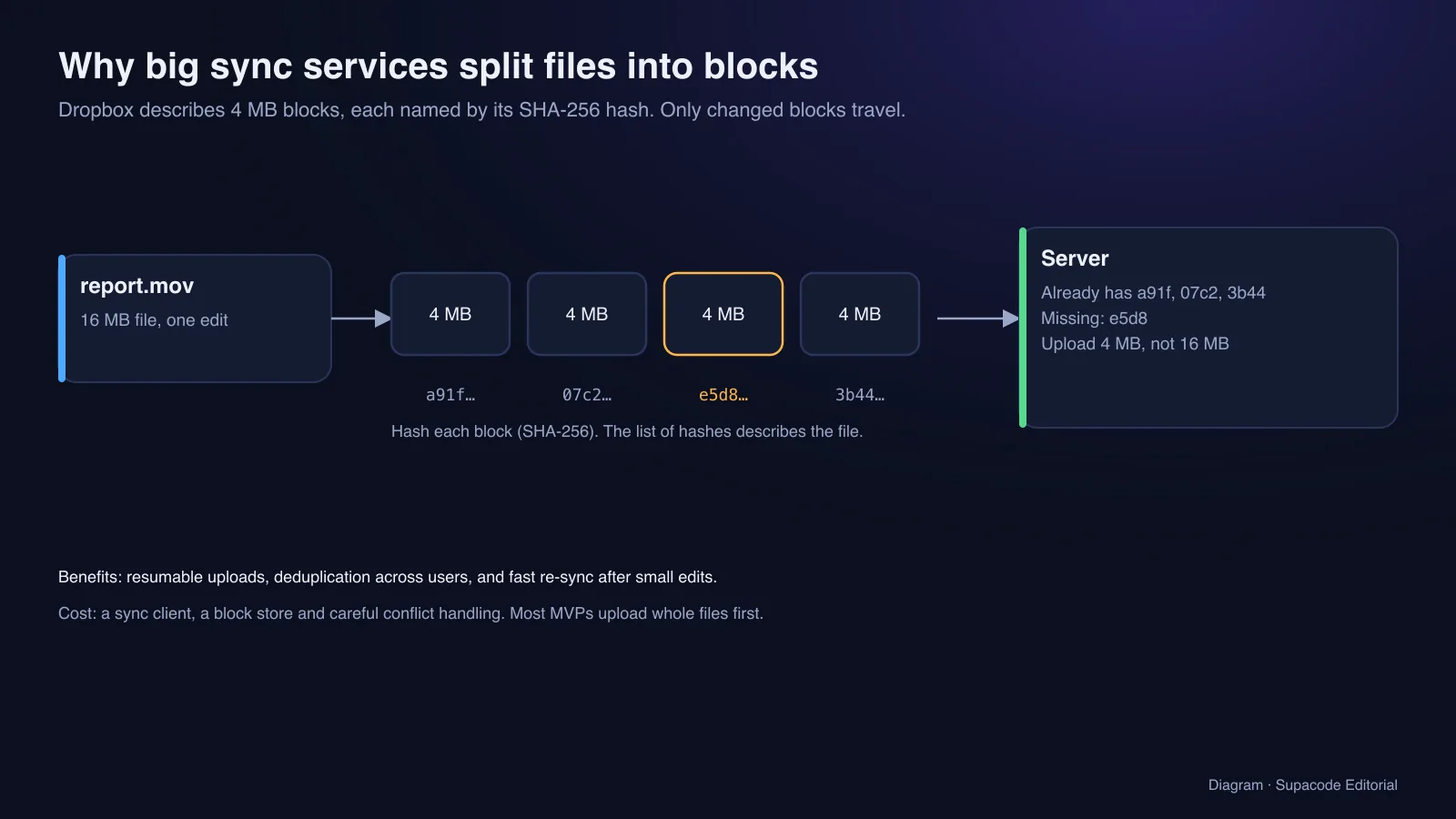
Behind the link sit three layers. Object storage holds the bytes. A database holds the facts about each file: its owner, folder, name, size, type and who may see it. An app lets people upload, browse, preview, search and share. Dropbox adds a fourth layer that most products never need: a sync client that watches folders on your computer. Its engineers have described splitting every file into 4 MB blocks named by their SHA-256 hash, and building a multi-exabyte storage system of their own called Magic Pocket.
You do not need an exabyte to start. You need the first three layers built correctly, so that what you launch for ten users still works for ten thousand. This guide explains those layers, what they cost, and how to get a working cloud drive with Supacode, an AI app builder that writes real Next.js code from a chat.
Do you need a cloud storage server, a storage system or an app?
The search phrase hides three different projects. Pick yours first.
- A cloud storage server at home: you want your own Dropbox for your family or office. Install open-source software such as Nextcloud on a NAS, a mini PC or a rented server, and follow its admin manual. This is system administration, not app building.
- A cloud storage system for your business: your app needs to store customer files (invoices, photos, contracts). Use a managed object store and build the upload, permission and download rules described below.
- A cloud storage product: you want to sell storage to other people, like Dropbox or a niche drive for photographers or architects. You need the system plus accounts, quotas, billing, sharing and a brand people trust with their files.
How does a cloud storage system work under the hood?
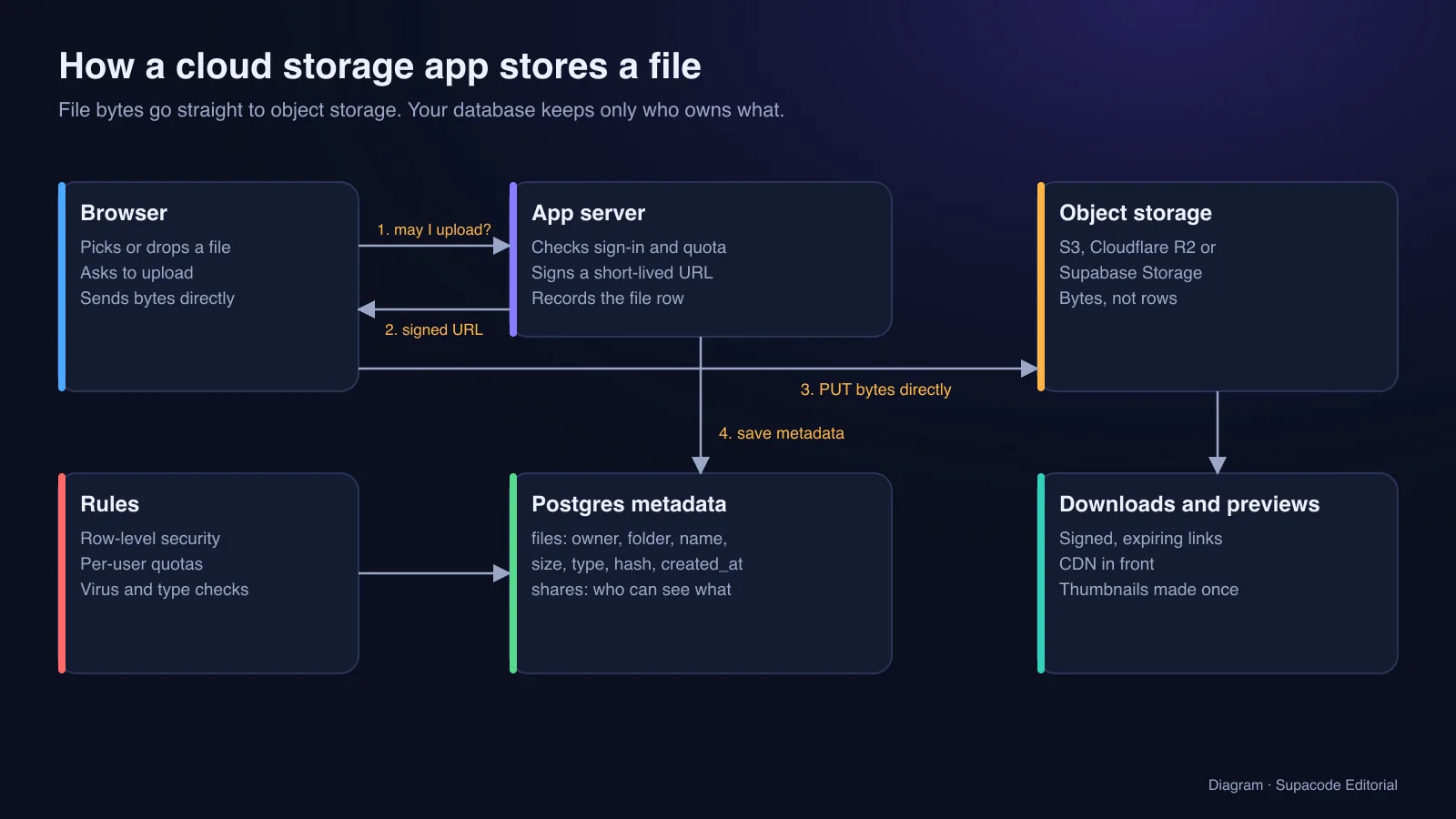
The rule that matters most: file bytes never pass through your application server. When someone uploads, the browser asks your server for permission. The server checks that they are signed in and under their quota, then returns a signed URL that is valid for a few minutes and only for one file path. The browser sends the file directly to object storage with that URL. Amazon documents the pattern as presigned URLs; Cloudflare R2 and Supabase Storage offer the same idea.
When the upload finishes, your server writes one row to the database: owner, folder, file name, size, content type, a content hash and the storage key. Folders are rows too. Sharing is a separate table that says which user or which link may read which file or folder, enforced in the database with row-level security so a bug in the interface cannot leak a file. Downloads use the same trick in reverse: a short-lived signed link, ideally behind a CDN.
Big files need resumable uploads, so a dropped connection on a train does not restart a 3 GB video. The open tus protocol is the common standard, and Supabase Storage recommends it for files over 6 MB. Durability is the storage provider's job: Amazon says S3 is designed for 99.999999999% (eleven nines) durability. Your job is backups of the metadata database and a plan for deleted files.
Why is file sync the hardest part to build?
A web drive uploads whole files when you ask it to. A sync client watches every folder on your laptop, notices a one-line edit to a 200 MB file, uploads only what changed, and resolves the conflict when you edited the same file on two machines while offline. That is why Dropbox splits files into blocks: if only one 4 MB block changed, only that block travels, and identical blocks are stored once.
Building that well takes a desktop app per operating system, a block store, a change journal and careful conflict rules. For a first product, skip it. Ship web upload, folders, previews, search and share links, then measure whether your users actually need a sync client before you spend a year on one.
How do you build a cloud storage app with Supacode, step by step?
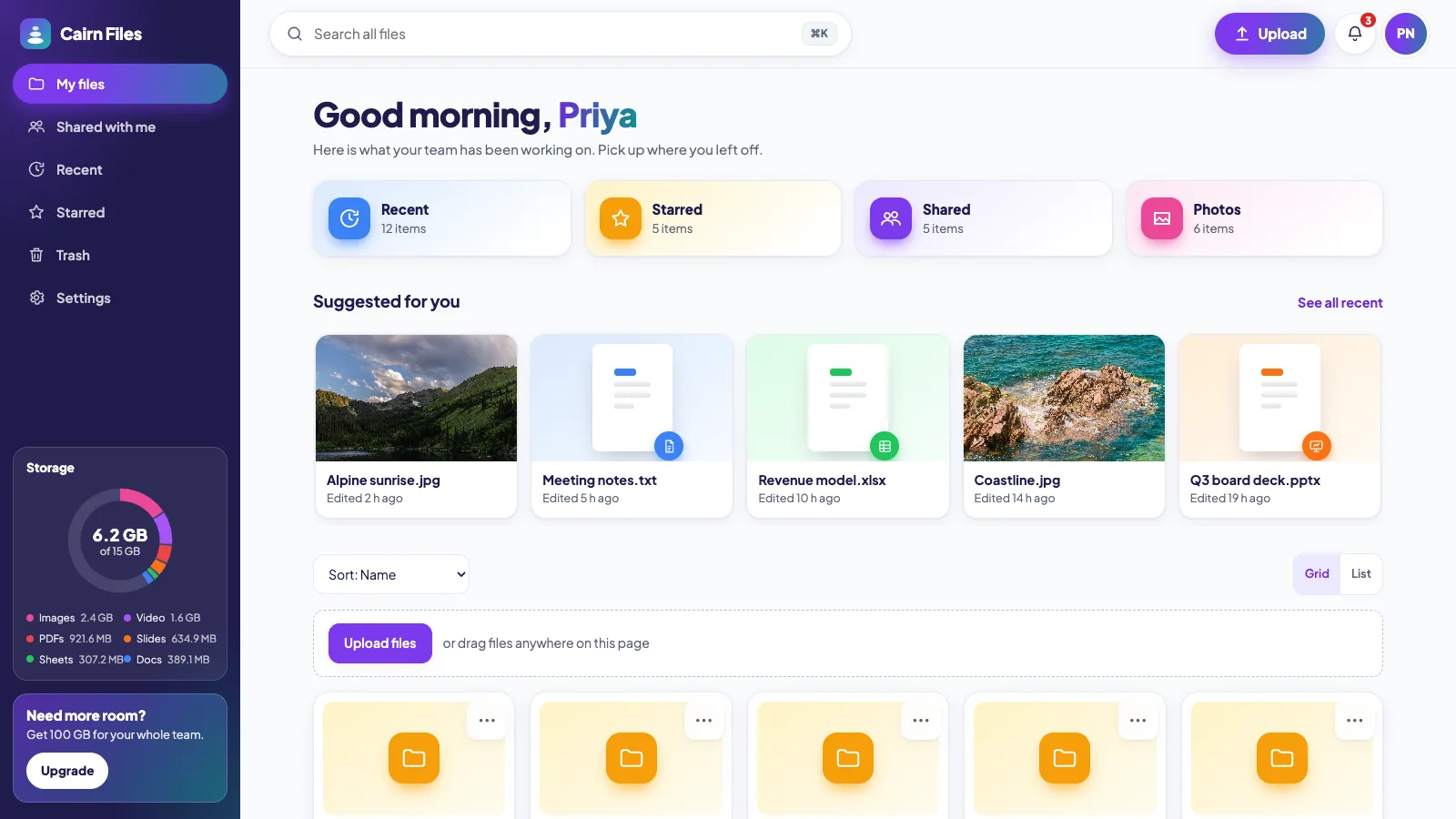
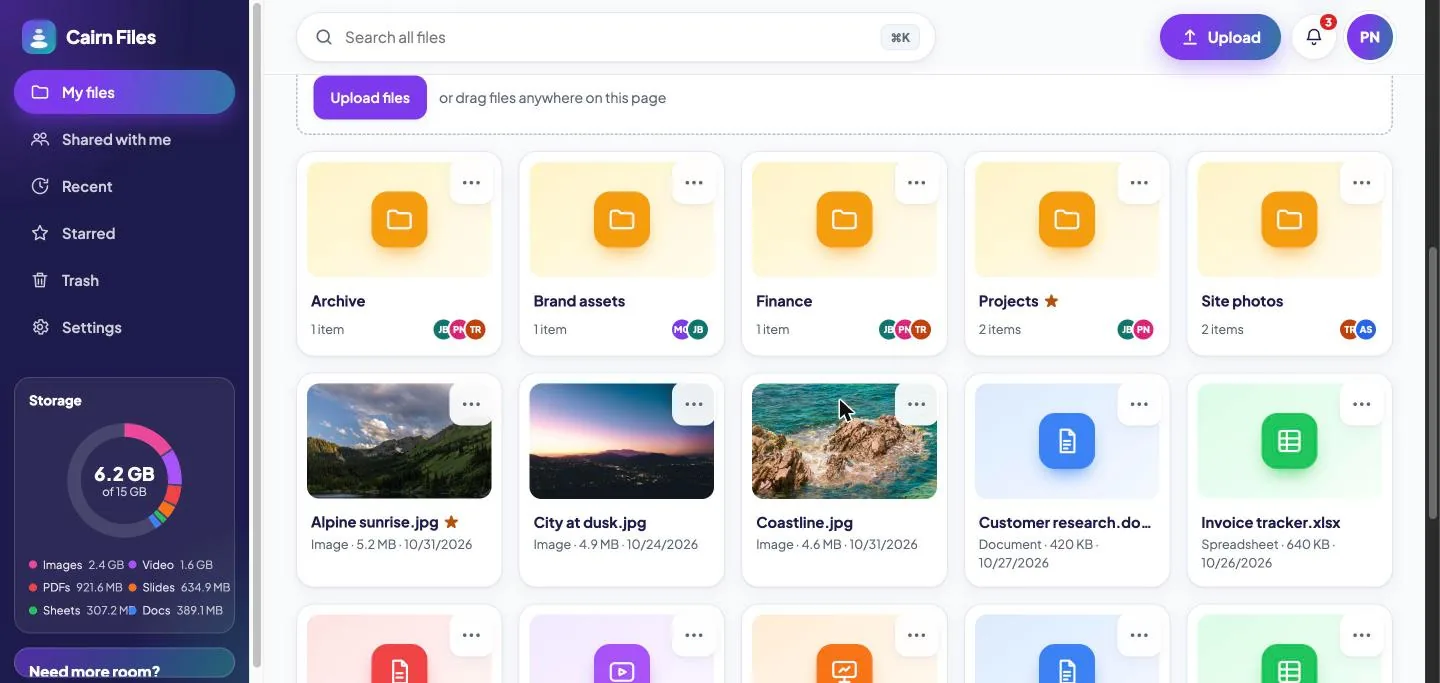
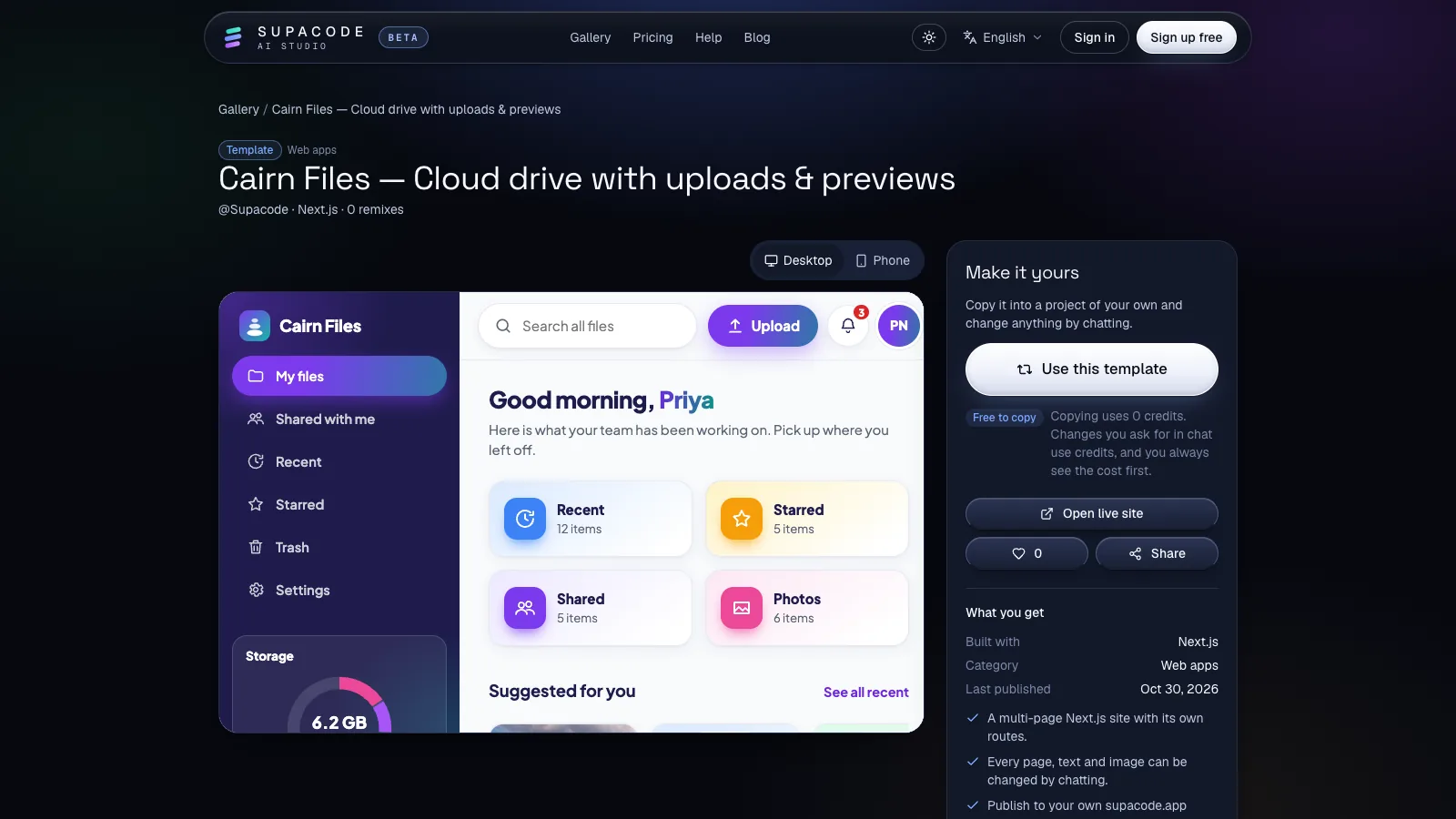
Start from the Cairn Files template in the gallery. It is a multi-page Next.js app with a sidebar for My files, Shared with me, Recent, Starred, Trash and Settings, a storage meter broken down by file type, search, grid and list views, sorting, folder cards and a drag-and-drop upload area. Press Use this template; copying uses 0 credits, and the composer shows the credit estimate before each change you ask for.
Then make it yours, one reviewable change at a time. Watch the live preview after each prompt; every change is saved as a version you can undo.
- Prompt 1, your audience:
Rebrand this as Darkroom, a cloud drive for wedding photographers. Rename the folders to Clients, Galleries, Contracts and Invoices, and use a warm black and cream palette. - Prompt 2, the file view:
When I click a file, open a preview panel with a large image preview, file details (size, type, uploaded date, owner) and buttons for Download, Share, Star and Move to trash. - Prompt 3, sharing:
Add a Share dialog: invite people by email as Viewer or Editor, or create a link with an optional expiry date and password. Show who has access. - Prompt 4, client delivery:
Add a public gallery page for a shared folder: a clean grid of photos, a Download all button and the photographer's logo, with no sidebar. - Prompt 5, quotas:
Show a warning at 90% of the storage quota and an Upgrade card in the sidebar. Plans: 50 GB and 500 GB.
How do you turn the template into real storage with accounts?
The template is a front end with sample files: perfect for designing the experience and testing it with users, but uploads are not stored anywhere yet. When an app needs a backend, Supacode typically builds the first version on sample data behind one data file and then offers to connect a database. Connect your own Supabase project in the studio's Backend tab. Supacode writes tables and row-level security as a migration, uses Supabase Auth for sign-in, and runs nothing on your database until you approve it; see Connect GitHub and Supabase.
Supabase projects also include Storage, an object store with its own access policies. Ask Supacode to keep file bytes in a private bucket and only metadata in Postgres; Supacode's own platform follows the same rule and never stores code or media in its database. Signed links and server-side quota checks run as Next.js API routes, which need a server: deploy the app to your own Vercel account from the Publish menu instead of static hosting.
- Prompt 6, real files:
Use my connected Supabase: sign-in with email, a files table and a folders table with row-level security so people only see their own files and files shared with them, and store file contents in a private Storage bucket, never in the database. - Prompt 7, safe uploads:
Upload directly from the browser to Storage with resumable uploads for files over 6 MB, show progress per file, reject executables, and enforce a 2 GB per-file limit on the server.
How much does it cost to run cloud storage?
Storage is cheap per gigabyte and expensive in surprises. Three meters run at once: gigabytes stored per month, requests (every upload, listing and download is one), and egress, the data sent out to the internet when people download. Egress is the one that bites file-sharing products. Cloudflare's R2 pricing charges nothing for egress, which is why many drives store on R2; Amazon S3 offers more storage classes and the eleven-nines durability design. Compare all three meters with your own usage before you choose.
For a first version, Supabase's free plan includes a small amount of file storage (1 GB at the time of writing), and free projects pause after a week of inactivity, so plan a paid tier before real users arrive. On Supacode, the Free plan gives 5 credits a day plus 20 welcome credits, and publishing to a supacode.app address is included; see pricing for paid plans and what they add.
- Web drive on a template with sample files: an afternoon to a few days.
- Real accounts, uploads, sharing and quotas on your own Supabase: one to a few weeks, most of it testing permissions.
- Desktop sync, offline edits, version history per file and team admin: months of specialist work.
What security does a cloud storage app need from day one?
People hand you their contracts, passports and family photos. Treat every upload as hostile and every download as private by default.
- Private buckets, signed links that expire, and permission checks in the database, not only in the interface.
- An allowlist of file types, a size limit enforced on the server, and checking the real file type rather than the extension.
- Never serve uploaded HTML or SVG inline from your main domain; download it or serve it from a separate domain.
- Encryption at rest (standard in managed object stores), HTTPS everywhere, and audit logs for shares.
- A data export and a real delete: when someone deletes their account, delete their files too, and say how long backups keep them.
Which templates fit file, media and team apps?
Cairn Files is the closest starting point for a drive. For an app that is mostly sign-in and a personal dashboard, start from Bloom; for shared team boards, Laneway. Browse all official templates in the gallery, filter by stack, and read how remixing works. If you are new to building with AI, How to build an app with AI covers the workflow in general.
FAQ
Frequently asked questions
How do I build my own cloud storage?
Use managed object storage for the bytes, a database for file metadata and sharing rules, and an app that uploads with short-lived signed URLs. With Supacode you can start from the Cairn Files template and connect your own Supabase project for accounts and storage.
How do I build a cloud storage server at home?
Install open-source software such as Nextcloud on a NAS, mini PC or rented server, add disks with a backup plan, and expose it securely over HTTPS. That is a self-hosting project; an app builder helps when you want your own branded product instead.
Should files be stored in the database?
No. Store file bytes in object storage and keep only metadata (owner, name, size, type, storage key, permissions) in the database. It is cheaper, faster and easier to back up.
How much does it cost to build an app like Dropbox?
A web drive can start on free tiers. Running costs grow with storage, requests and download traffic. Full desktop sync with conflict handling is the expensive part and can take a specialist team months.
Is it safe to build cloud storage with AI?
The code can be safe if you review the rules that matter: private buckets, signed expiring links, row-level security, file-type and size checks on the server. Supacode writes real code you can read, version and push to your own GitHub repository on paid plans.
Can I make a cloud storage app for free?
You can build and publish the front end free: copy the Cairn Files template for 0 credits and publish to a supacode.app address. Real uploads need a backend; Supabase has a free tier for small projects.
Sources
- Inside the Magic Pocket · Dropbox Tech Blog
- Streaming file synchronization · Dropbox Tech Blog
- Sharing objects with presigned URLs · Amazon S3 documentation
- Amazon S3 storage classes · Amazon Web Services
- R2 pricing · Cloudflare documentation
- Resumable uploads · Supabase documentation
- tus: resumable file uploads · tus.io
- Nextcloud server administration manual · Nextcloud